🔍

PCNE — questions

Page 7 of 13 · 255 total questions.

Topic 1 · Question 122

You are planning a large application deployment in Google Cloud that includes on-premises connectivity. The application requires direct connectivity between workloads in all regions and on-premises locations without address translation, but all RFC 1918 ranges are already in use in the on-premises locations. What should you do?

  • AUse multiple VPC networks with a transit network using VPC Network Peering.
  • BUse overlapping RFC 1918 ranges with multiple isolated VPC networks.
  • CUse overlapping RFC 1918 ranges with multiple isolated VPC networks and Cloud NAT.
  • DUse non-RFC 1918 ranges with a single global VPC. (correct answer)
Reveal answer & explanation
Correct answer: D

The correct answer is D. Option D: Use non-RFC 1918 ranges with a single global VPC.

Explanation

A VPC provides a global, software-defined private network for your Google Cloud resources.
Topic 1 · Question 123

Your company's security team wants to limit the type of inbound traffic that can reach your web servers to protect against security threats. You need to configure the firewall rules on the web servers within your Virtual Private Cloud (VPC) to handle HTTP and HTTPS web traffic for TCP only. What should you do?

  • ACreate an allow on match ingress firewall rule with the target tag “web-server” to allow all IP addresses for TCP port 80.
  • BCreate an allow on match egress firewall rule with the target tag “web-server” to allow all IP addresses for TCP port 80.
  • CCreate an allow on match ingress firewall rule with the target tag “web-server” to allow all IP addresses for TCP ports 80 and 443. (correct answer)
  • DCreate an allow on match egress firewall rule with the target tag “web-server" to allow web server IP addresses for TCP ports 80 and 443.
Reveal answer & explanation
Correct answer: C

The correct answer is C. Option C: Create an allow on match ingress firewall rule with the target tag “web-server” to allow all IP addresses for TCP ports 80 and 443.

Topic 1 · Question 124

You successfully provisioned a single Dedicated Interconnect. The physical connection is at a colocation facility closest to us-west2. Seventy-five percent of your workloads are in us-east4, and the remaining twenty-five percent of your workloads are in us-central1. All workloads have the same network traffic profile. You need to minimize data transfer costs when deploying VLAN attachments. What should you do?

  • AKeep the existing Dedicated interconnect. Deploy a VLAN attachment to a Cloud Router in us-west2, and use VPC global routing to access workloads in us-east4 and us-central1.
  • BKeep the existing Dedicated Interconnect. Deploy a VLAN attachment to a Cloud Router in us-east4, and deploy another VLAN attachment to a Cloud Router in us-central1. (correct answer)
  • COrder a new Dedicated Interconnect for a colocation facility closest to us-east4, and use VPC global routing to access workloads in us-central1.
  • DOrder a new Dedicated Interconnect for a colocation facility closest to us-central1, and use VPC global routing to access workloads in us-east4.
Reveal answer & explanation
Correct answer: B

The correct answer is B. Option B: Keep the existing Dedicated Interconnect. Deploy a VLAN attachment to a Cloud Router in us-east4, and deploy another VLAN attachment to a Cloud Router in us-central1.

Explanation

Dedicated Interconnect provides a private physical connection into Google's network.

Topic 1 · Question 125

You are designing a hybrid cloud environment. Your Google Cloud environment is interconnected with your on-premises network using HA VPN and Cloud Router in a central transit hub VPC. The Cloud Router is configured with the default settings. Your on-premises DNS server is located at 192.168.20.88. You need to ensure that your Compute Engine resources in multiple spoke VPCs can resolve on-premises private hostnames using the domain corp.altostrat.com while also resolving Google Cloud hostnames. You want to follow Google-recommended practices. What should you do?

  • A1. Create a private forwarding zone in Cloud DNS for ‘corp.altostrat.com’ called corp-altostrat-com that points to 192.168.20.88. Associate the zone with the hub VPC.2. Create a private peering zone in Cloud DNS for ‘corp.altostrat.com’ called corp-altostrat-com associated with the spoke VPCs, with the hub VPC as the target.3. Set a custom route advertisement on the Cloud Router for 35.199.192.0/19.4. Configure VPC peering in the spoke VPCs to peer with the hub VPC. (correct answer)
  • B1. Create a private forwarding zone in Cloud DNS for ‘corp.altostrat.com’ called corp-altostrat-com that points to 192.168.20.88.2. Associate the zone with the hub VPC. Create a private peering zone in Cloud DNS for ‘corp.altostrat.com’ called corp-altostrat-com associated with the spoke PCs, with the hub VPC as the target.3. Set a custom route advertisement on the Cloud Router for 35.199.192.0/19.
  • C1. Create a private forwarding zone in Cloud DNS for ‘corp.altostrat.com’ called corp-altostrat-com that points to 192.168.20.88. Associate the zone with the hub VPC.2. Create a private peering zone in Cloud DNS for ‘corp.altostrat.com’ called corp-altostrat-com associated with the spoke VPCs, with the hub VPC as the target.3. Set a custom route advertisement on the Cloud Router for 35.199.192.0/19.4. Create a hub-and-spoke VPN deployment in each spoke VPC to connect back to the on-premises network directly.
  • D1. Create a private forwarding zone in Cloud DNS for ‘corp altostrat.com’ called corp-altostrat-com that points to 192. 168.20.88. Associate the zone with the hub VPC.2. Create a private peering zone in Cloud DNS for ‘corp.altostrat.com’ called corp-altostrat-com associated with the spoke VPCs, with the hub VPC as the target.3. Sat a custom route advertisement on the Cloud Router for 35.199.192.0/19.4. Create a hub and spoke VPN deployment in each spoke VPC to connect back to the hub VPC.
Reveal answer & explanation
Correct answer: A

The correct answer is A. Option A: 1. Create a private forwarding zone in Cloud DNS for ‘corp.altostrat.com’ called corp-altostrat-com that points to 192.168.20.88. Associate the zone with the hub VPC.2. Create a private peering zone in Cloud DNS for ‘...

Explanation

Cloud DNS provides scalable, authoritative DNS with health checks and routing policies. VPC Network Peering privately connects two VPC networks without a gateway. A VPC provides a global, software-defined private network for your Google Cloud resources.

Topic 1 · Question 126

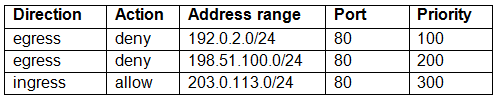
You have the following firewall ruleset applied to all instances in your Virtual Private Cloud (VPC): You need to update the firewall rule to add the following rule to the ruleset: You are using a new user account. You must assign the appropriate identity and Access Management (IAM) user roles to this new user account before updating the firewall rule. The new user account must be able to apply the update and view firewall logs. What should you do?

Exhibit 1 for question 126Exhibit 2 for question 126
  • AAssign the compute.securityAdmin and logging.viewer rule to the new user account. Apply the new firewall rule with a priority of 50. (correct answer)
  • BAssign the compute.securityAdmin and logging.bucketWriter role to the new user account. Apply the new firewall rule with a priority of 150.
  • CAssign the compute.orgSecurityPolicyAdmin and logging.viewer role to the new user account. Apply the new firewall rule with a priority of 50.
  • DAssign the compute.orgSecurityPolicyAdmin and logging.bucketWriter role to the new user account. Apply the new firewall rule with a priority of 150.
Reveal answer & explanation
Correct answer: A

The correct answer is A. Option A: Assign the compute.securityAdmin and logging.viewer rule to the new user account. Apply the new firewall rule with a priority of 50.

Topic 1 · Question 127

Your organization has a single project that contains multiple Virtual Private Clouds (VPCs). You need to secure API access to your Cloud Storage buckets and BigQuery datasets by allowing API access only from resources in your corporate public networks. What should you do?

  • ACreate an access context policy that allows your VPC and corporate public network IP ranges, and then attach the policy to Cloud Storage and BigQuery.
  • BCreate a VPC Service Controls perimeter for your project with an access context policy that allows your corporate public network IP ranges. (correct answer)
  • CCreate a firewall rule to block API access to Cloud Storage and BigQuery from unauthorized networks.
  • DCreate a VPC Service Controls perimeter for each VPC with an access context policy that allows your corporate public network IP ranges.
Reveal answer & explanation
Correct answer: B

The correct answer is B. Option B: Create a VPC Service Controls perimeter for your project with an access context policy that allows your corporate public network IP ranges.

Explanation

VPC Service Controls create a security perimeter around managed services to prevent data exfiltration. A VPC provides a global, software-defined private network for your Google Cloud resources.

Topic 1 · Question 128 · Select all that apply

Your company has provisioned 2000 virtual machines (VMs) in the private subnet of your Virtual Private Cloud (VPC) in the us-east1 region. You need to configure each VM to have a minimum of 128 TCP connections to a public repository so that users can download software updates and packages over the internet. You need to implement a Cloud NAT gateway so that the VMs are able to perform outbound NAT to the internet. You must ensure that all VMs can simultaneously connect to the public repository and download software updates and packages. Which two methods can you use to accomplish this? (Choose two.)

  • AConfigure the NAT gateway in manual allocation mode, allocate 2 NAT IP addresses, and update the minimum number of ports per VM to 256.
  • BCreate a second Cloud NAT gateway with the default minimum number of ports configured per VM to 64.
  • CUse the default Cloud NAT gateway's NAT proxy to dynamically scale using a single NAT IP address.
  • DUse the default Cloud NAT gateway to automatically scale to the required number of NAT IP addresses, and update the minimum number of ports per VM to 128. (correct answer)
  • EConfigure the NAT gateway in manual allocation mode, allocate 4 NAT IP addresses, and update the minimum number of ports per VM to 128. (correct answer)
Reveal answer & explanation
Correct answer: D, E

The correct answer is D, E. Option D: Use the default Cloud NAT gateway to automatically scale to the required number of NAT IP addresses, and update the minimum number of ports per VM to 128. Option E: Configure the NAT gateway in manual allocation mode, allocate 4 NAT IP addresses, and update the minimum number of ports per VM to 128.

Explanation

Cloud NAT lets private instances reach the internet for outbound traffic without external IPs.

Topic 1 · Question 129

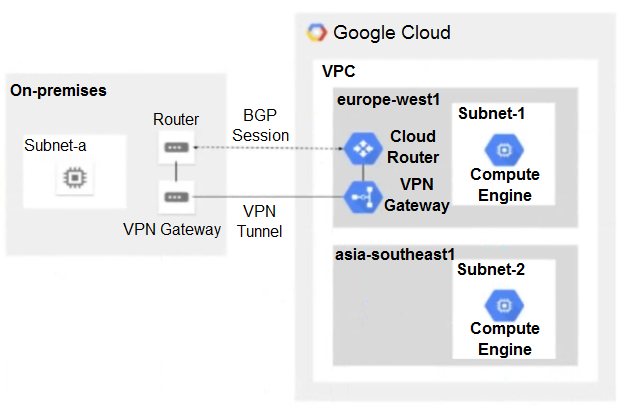
You have the following routing design. You discover that Compute Engine instances in Subnet-2 in the asia-southeast1 region cannot communicate with compute resources on-premises. What should you do?

Exhibit 1 for question 129
  • AConfigure a custom route advertisement on the Cloud Router.
  • BEnable IP forwarding in the asia-southeast1 region.
  • CChange the VPC dynamic routing mode to Global. (correct answer)
  • DAdd a second Border Gateway Protocol (BGP) session to the Cloud Router.
Reveal answer & explanation
Correct answer: C

The correct answer is C. Option C: Change the VPC dynamic routing mode to Global.

Explanation

A VPC provides a global, software-defined private network for your Google Cloud resources.

Topic 1 · Question 130

You are designing a hybrid cloud environment for your organization. Your Google Cloud environment is interconnected with your on-premises network using Cloud HA VPN and Cloud Router. The Cloud Router is configured with the default settings. Your on-premises DNS server is located at 192.168.20.88 and is protected by a firewall, and your Compute Engine resources are located at 10.204.0.0/24. Your Compute Engine resources need to resolve on-premises private hostnames using the domain corp.altostrat.com while still resolving Google Cloud hostnames. You want to follow Google-recommended practices. What should you do?

  • A1. Create a private forwarding zone in Cloud DNS for ‘corp.altostrat.com’ called corp-altostrat-com that points to 192.168.20.88.2. Configure your on-premises firewall to accept traffic from 10.204.0.0/24.3. Set a custom route advertisement on the Cloud Router for 10.204.0.0/24
  • B1. Create a private forwarding zone in Cloud DNS for ‘corp.altostrat.com’ called corp-altostrat-com that points to 192.168 20.88.2. Configure your on-premises firewall to accept traffic from 35.199.192.0/193. Set a custom route advertisement on the Cloud Router for 35.199.192.0/19. (correct answer)
  • C1. Create a private forwarding zone in Cloud DNS for ‘corp .altostrat.com’ called corp-altostrat-com that points to 192.168.20.88.2. Configure your on-premises firewall to accept traffic from 10.204.0.0/24.3. Modify the /etc/resolv conf file on your Compute Engine instances to point to 192.168.20 88
  • D1. Create a private zone in Cloud DNS for ‘corp altostrat.com’ called corp-altostrat-com.2. Configure DNS Server Policies and create a policy with Alternate DNS servers to 192.168.20.88.3. Configure your on-premises firewall to accept traffic from 35.199.192.0/19.4. Set a custom route advertisement on the Cloud Router for 35.199.192.0/19.
Reveal answer & explanation
Correct answer: B

The correct answer is B. Option B: 1. Create a private forwarding zone in Cloud DNS for ‘corp.altostrat.com’ called corp-altostrat-com that points to 192.168 20.88.2. Configure your on-premises firewall to accept traffic from 35.199.192.0/193. Set a cu...

Explanation

Cloud DNS provides scalable, authoritative DNS with health checks and routing policies.

Topic 1 · Question 131

Your company has a single Virtual Private Cloud (VPC) network deployed in Google Cloud with on-premises connectivity already in place. You are deploying a new application using Google Kubernetes Engine (GKE), which must be accessible only from the same VPC network and on-premises locations. You must ensure that the GKE control plane is exposed to a predefined list of on-premises subnets through private connectivity only. What should you do?

  • ACreate a GKE private cluster with a private endpoint for the control plane. Configure VPC Networking Peering export/import routes and custom route advertisements on the Cloud Routers. Configure authorized networks to specify the desired on-premises subnets. (correct answer)
  • BCreate a GKE private cluster with a public endpoint for the control plane. Configure VPC Networking Peering export/import routes and custom route advertisements on the Cloud Routers.
  • CCreate a GKE private cluster with a private endpoint for the control plane. Configure authorized networks to specify the desired on-premises subnets.
  • DCreate a GKE public cluster. Configure authorized networks to specify the desired on-premises subnets.
Reveal answer & explanation
Correct answer: A

The correct answer is A. Option A: Create a GKE private cluster with a private endpoint for the control plane. Configure VPC Networking Peering export/import routes and custom route advertisements on the Cloud Routers. Configure authorized networks to...

Explanation

Google Kubernetes Engine runs managed Kubernetes for containerized, portable workloads. A VPC provides a global, software-defined private network for your Google Cloud resources.

Topic 1 · Question 132

You built a web application with several containerized microservices. You want to run those microservices on Cloud Run. You must also ensure that the services are highly available to your customers with low latency. What should you do?

  • ADeploy the Cloud Run services to multiple availability zones. Create a global TCP load balancer. Add the Cloud Run endpoints to its backend service.
  • BDeploy the Cloud Run services to multiple regions. Create serverless network endpoint groups (NEGs) that point to the services. Create a global HTTPS load balancer, and attach the serverless NEGs as backend services of the load balancer. (correct answer)
  • CDeploy the Cloud Run services to multiple availability zones. Create Cloud Endpoints that point to the services. Create a global HTTPS load balancer, and attach the Cloud Endpoints to its backend
  • DDeploy the Cloud Run services to multiple regions. Configure a round-robin A record in Cloud DNS.
Reveal answer & explanation
Correct answer: B

The correct answer is B. Option B: Deploy the Cloud Run services to multiple regions. Create serverless network endpoint groups (NEGs) that point to the services. Create a global HTTPS load balancer, and attach the serverless NEGs as backend services o...

Explanation

Cloud Run runs stateless containers serverlessly and scales to zero, minimizing operational overhead. A load balancer distributes traffic across healthy backends in multiple zones for availability and scale. By spanning multiple Availability Zones / adding redundancy, this option provides the high availability and resilience required.

Topic 1 · Question 133

You have an HA VPN connection with two tunnels running in active/passive mode between your Virtual Private Cloud (VPC) and on-premises network. Traffic over the connection has recently increased from 1 gigabit per second (Gbps) to 4 Gbps, and you notice that packets are being dropped. You need to configure your VPN connection to Google Cloud to support 4 Gbps. What should you do?

  • AConfigure the remote autonomous system number (ASN) to 4096.
  • BConfigure a second Cloud Router to scale bandwidth in and out of the VPC.
  • CConfigure the maximum transmission unit (MTU) to its highest supported value.
  • DConfigure a second set of active/passive VPN tunnels. (correct answer)
Reveal answer & explanation
Correct answer: D

The correct answer is D. Option D: Configure a second set of active/passive VPN tunnels.

Topic 1 · Question 134

You recently deployed two network virtual appliances in us-central1. Your network appliances provide connectivity to your on-premises network, 10.0.0.0/8. You need to configure the routing for your Virtual Private Cloud (VPC). Your design must meet the following requirements: • All access to your on-premises network must go through the network virtual appliances. • Allow on-premises access in the event of a single network virtual appliance failure. • Both network virtual appliances must be used simultaneously. Which method should you use to accomplish this?

  • AConfigure two routes for 10.0.0.0/8 with different priorities, each pointing to separate network virtual appliances.
  • BConfigure an internal HTTP(S) load balancer with the two network virtual appliances as backends. Configure a route for 10.0.0.0/8 with the internal HTTP(S) load balancer as the next hop.
  • CConfigure a network load balancer for the two network virtual appliances. Configure a route for 10.0.0.0/8 with the network load balancer as the next hop.
  • DConfigure an internal TCP/UDP load balancer with the two network virtual appliances as backends. Configure a route for 10.0.0.0/8 with the internal load balancer as the next hop. (correct answer)
Reveal answer & explanation
Correct answer: D

The correct answer is D. Option D: Configure an internal TCP/UDP load balancer with the two network virtual appliances as backends. Configure a route for 10.0.0.0/8 with the internal load balancer as the next hop.

Explanation

A load balancer distributes traffic across healthy backends in multiple zones for availability and scale.

Topic 1 · Question 135

You are responsible for enabling Private Google Access for the virtual machine (VM) instances in your Virtual Private Cloud (VPC) to access Google APIs. All VM instances have only a private IP address and need to access Cloud Storage. You need to ensure that all VM traffic is routed back to your on-premises data center for traffic scrubbing via your existing Cloud Interconnect connection. However, VM traffic to Google APIs should remain in the VPC. What should you do?

  • A1. Delete the default route in your VPC.2. Create a private Cloud DNS zone for googleapis.com, create a CNAME for *.googleapis.com to restricted googleapis.com, and create an A record for restricted googleapis com that resolves to the addresses in 199.36.153.4/30.3. Create a static route in your VPC for the range 199.36.153.4/30 with the default internet gateway as the next hop.
  • B1. Delete the default route in your VPC and configure your on-premises router to advertise 0.0.0.0/0 via Border Gateway Protocol (BGP).2. Create a public Cloud DNS zone with a CNAME for *.google.com to private googleapis com, create a CNAME for * googleapis.com to private googleapis com, and create an A record for Private googleapis.com that resolves to the addresses in 199.36.153 8/30.3. Create a static route in your VPC for the range 199 .36.153.8/30 with the default internet gateway as the next hop.
  • C1. Configure your on-premises router to advertise 0.0.0.0/0 via Border Gateway Protocol (BGP) with a lower priority (MED) than the default VPC route.2. Create a private Cloud DNS zone for googleapis.com, create a CNAME for * googieapis.com to private googleapis com, and create an A record for private.googleapis.com that resolves to the addresses in 199 .36.153.8/30.3. Create a static route in your VPC for the range 199.36. 153.8/30 with the default internet gateway as the next hop.
  • D1. Delete the default route in your VPC and configure your on-premises router to advertise 0.0.0.0/0 via Border Gateway Protocol (BGP).2. Create a private Cloud DNS zone for googleapis.com, create a CNAME for * googieapis.com to Private googleapis.com, and create an A record for private.googleapis.com that resolves to the addresses in 199.36.153.8/30.3. Create a static route in your VPC for the range 199.36.153.8/30 with the default internet gateway as the next hop. (correct answer)
Reveal answer & explanation
Correct answer: D

The correct answer is D. Option D: 1. Delete the default route in your VPC and configure your on-premises router to advertise 0.0.0.0/0 via Border Gateway Protocol (BGP).2. Create a private Cloud DNS zone for googleapis.com, create a CNAME for * googie...

Explanation

Cloud DNS provides scalable, authoritative DNS with health checks and routing policies. A VPC provides a global, software-defined private network for your Google Cloud resources.

Topic 1 · Question 136

You are designing a hub-and-spoke network architecture for your company’s cloud-based environment. You need to make sure that all spokes are peered with the hub. The spokes must use the hub's virtual appliance for internet access. The virtual appliance is configured in high-availability mode with two instances using an internal load balancer with IP address 10.0.0.5. What should you do?

  • A1. Create a default route in the hub VPC that points to IP address 10.0.0.5.2. Delete the default internet gateway route in the hub VPC, and create a new higher-priority route that is tagged only to the appliances with a next hop of the default internet gateway.3. Export the custom routes in the hub.4. Import the custom routes in the spokes.
  • B1. Create a default route in the hub VPC that points to IP address 10.0.0.5.2. Delete the default internet gateway route in the hub VPC, and create a new higher-priority route that is tagged only to the appliances with a next hop of the default internet gateway.3. Export the custom routes in the hub. Import the custom routes in the spokes.4. Delete the default internet gateway route of the spokes. (correct answer)
  • C1. Create two default routes in the hub VPC that point to the next hop instances of the virtual appliances.2. Delete the default internet gateway route in the hub VPC, and create a new higher-priority route that is tagged only to the appliances with a next hop of the default internet gateway.3. Export the custom routes in the hub. Import the custom routes in the spokes.
  • D1. Create a default route in the hub VPC that points to IP address 10.0.0.5.2. Delete the default internet gateway route in the hub VPC, and create a new higher-priority route that is tagged only to the appliances with a next hop of the default internet gateway.3. Create a new route in the spoke VPC that points to IP address 10.0.0.5.
Reveal answer & explanation
Correct answer: B

The correct answer is B. Option B: 1. Create a default route in the hub VPC that points to IP address 10.0.0.5.2. Delete the default internet gateway route in the hub VPC, and create a new higher-priority route that is tagged only to the appliances wit...

Explanation

A VPC provides a global, software-defined private network for your Google Cloud resources.
Topic 1 · Question 137

You configured Cloud VPN with dynamic routing via Border Gateway Protocol (BGP). You added a custom route to advertise a network that is reachable over the VPN tunnel. However, the on-premises clients still cannot reach the network over the VPN tunnel. You need to examine the logs in Cloud Logging to confirm that the appropriate routers are being advertised over the VPN tunnel. Which filter should you use in Cloud Logging to examine the logs?

  • Aresource.type= “gce_router” (correct answer)
  • Bresource.type= “gce_network_region”
  • Cresource.type= “vpn_tunnel”
  • Dresource.type= “vpn_gateway”
Reveal answer & explanation
Correct answer: A

The correct answer is A. Option A: resource.type= “gce_router”.

Topic 1 · Question 138

Your company has a single Virtual Private Cloud (VPC) network deployed in Google Cloud with access from on-premises locations using Cloud Interconnect connections. Your company must be able to send traffic to Cloud Storage only through the Interconnect links while accessing other Google APIs and services over the public internet. What should you do?

  • AUse the default public domains for all Google APIs and services.
  • BUse Private Service Connect to access Cloud Storage, and use the default public domains for all other Google APIs and services. (correct answer)
  • CUse Private Google Access, with restricted.googleapis.com virtual IP addresses for Cloud Storage and private.googleapis.com for all other Google APIs and services.
  • DUse Private Google Access, with private.googleapis.com virtual IP addresses for Cloud Storage and restricted.googleapis.com virtual IP addresses for all other Google APIs and services.
Reveal answer & explanation
Correct answer: B

The correct answer is B. Option B: Use Private Service Connect to access Cloud Storage, and use the default public domains for all other Google APIs and services.

Explanation

Cloud Storage provides durable, scalable object storage that is fully managed. Private Service Connect exposes and consumes services privately within VPCs without internet exposure.

Topic 1 · Question 139

Your organization has a Google Cloud Virtual Private Cloud (VPC) with subnets in us-east1, us-west4, and europe-west4 that use the default VPC configuration. Employees in a branch office in Europe need to access the resources in the VPC using HA VPN. You configured the HA VPN associated with the Google Cloud VPC for your organization with a Cloud Router deployed in europe-west4. You need to ensure that the users in the branch office can quickly and easily access all resources in the VPC. What should you do?

  • ACreate custom advertised routes for each subnet.
  • BConfigure each subnet’s VPN connections to use Cloud VPN to connect to the branch office.
  • CConfigure the VPC dynamic routing mode to Global. (correct answer)
  • DSet the advertised routes to Global for the Cloud Router.
Reveal answer & explanation
Correct answer: C

The correct answer is C. Option C: Configure the VPC dynamic routing mode to Global.

Explanation

A VPC provides a global, software-defined private network for your Google Cloud resources.

Topic 1 · Question 140

Your organization uses a Shared VPC architecture with a host project and three service projects. You have Compute Engine instances that reside in the service projects. You have critical workloads in your on-premises data center. You need to ensure that the Google Cloud instances can resolve on-premises hostnames via the Dedicated Interconnect you deployed to establish hybrid connectivity. What should you do?

  • A1. Create a Cloud DNS private forwarding zone in the host project of the Shared VPC that forwards the private zone to the on-premises DNS servers.2. In your Cloud Router, add a custom route advertisement for the IP 35.199.192.0/19 to the on-premises environment. (correct answer)
  • B1. Create a Cloud DNS private forwarding zone in the host project of the Shared VPC that forwards the Private zone to the on-premises DNS servers.2. In your Cloud Router, add a custom route advertisement for the IP 169.254 169.254 to the on-premises environment.
  • C1. Configure a Cloud DNS private zone in the host project of the Shared VPC.2. Set up DNS forwarding to your Google Cloud private zone on your on-premises DNS servers to point to the inbound forwarder IP address in your host project3. In your Cloud Router, add a custom route advertisement for the IP 169.254 169 254 to the on-premises environment.
  • D1.Configure a Cloud DNS private zone in the host project of the Shared VPC.2. Set up DNS forwarding to your Google Cloud private zone on your on-premises DNS servers to point to the inbound forwarder IP address in your host project.3. Configure a DNS policy in the Shared VPC to allow inbound query forwarding with your on-premises DNS server as the alternative DNS server.
Reveal answer & explanation
Correct answer: A

The correct answer is A. Option A: 1. Create a Cloud DNS private forwarding zone in the host project of the Shared VPC that forwards the private zone to the on-premises DNS servers.2. In your Cloud Router, add a custom route advertisement for the IP 35...

Explanation

Cloud DNS provides scalable, authoritative DNS with health checks and routing policies. Shared VPC centralizes network administration by sharing one VPC across multiple projects. A VPC provides a global, software-defined private network for your Google Cloud resources.

Topic 1 · Question 141

Your organization is implementing a new security policy to control how firewall rules are applied to control flows between virtual machines (VMs). Using Google-recommended practices, you need to set up a firewall rule to enforce strict control of traffic between VM A and VM B. You must ensure that communications flow only from VM A to VM B within the VPC, and no other communication paths are allowed. No other firewall rules exist in the VPC. Which firewall rule should you configure to allow only this communication path?

  • AFirewall rule direction: ingressAction: allow -Target: VM B service account -Source ranges: VM A service accountPriority: 1000 (correct answer)
  • BFirewall rule direction: ingressAction: allow -Target: specific VM B tag -Source ranges: VM A tag and VM A source IP addressPriority: 1000
  • CFirewall rule direction: ingressAction: allow -Target: VM A service account -Source ranges: VM B service account and VM B source IP addressPriority: 100
  • DFirewall rule direction: ingressAction: allow -Target: specific VM A tag -Source ranges: VM B tag and VM B source IP addressPriority: 100
Reveal answer & explanation
Correct answer: A

The correct answer is A. Option A: Firewall rule direction: ingressAction: allow -Target: VM B service account -Source ranges: VM A service accountPriority: 1000

Explanation

A service account provides an identity for workloads to access Google Cloud APIs securely.

Showing questions 121140 of 255 · Page 7 of 13